How to Build an AI Workflow Automation That Lasts
Build it in 6 phases: baseline the task, split the steps into model, rule and human, wire the deterministic skeleton first, add model steps with confidence thresholds, evaluate against real test cases, then run beside a human for 2 weeks. Then watch the 6 numbers that tell you it is still working.
On this page
You build an AI workflow automation in 6 phases: baseline the task, split the steps into model, rule and human, wire the deterministic skeleton first, add the model steps with confidence thresholds, evaluate against a real test set, then run it beside a human for 2 weeks before removing supervision. The model goes in at phase 4, not phase 1.
Most guides to building an AI workflow automation stop at the moment something works in a demo. That is the easy part now, and it is also where the trouble starts, because a workflow that passed every check on launch day can quietly degrade weeks later without throwing a single error. This guide covers the build sequence, and then the 6 numbers that tell you it is still working.
On this page
- What to decide before you build
- How do you build an AI workflow automation?
- Why deterministic first
- Thresholds, queues and logs
- How do you know it actually works?
- The 6 checks after launch
- Which platform should you build on?
- How long does it take?
- How these figures were arrived at
- Frequently asked questions
What to decide before you build
One decision governs everything that follows: which steps need a model and which must stay rules. We covered that boundary in detail in where the model belongs in an AI workflow, and the short version is that models earn their place where information arrives unstructured or leaves as language, and nowhere else. Pricing, routing and anything that writes to a system of record stay deterministic.
If you have not made that call, stop here and make it. Every phase below assumes you know which of your steps are model steps, and a build that gets this wrong cannot be rescued by better engineering later.
How do you build an AI workflow automation?
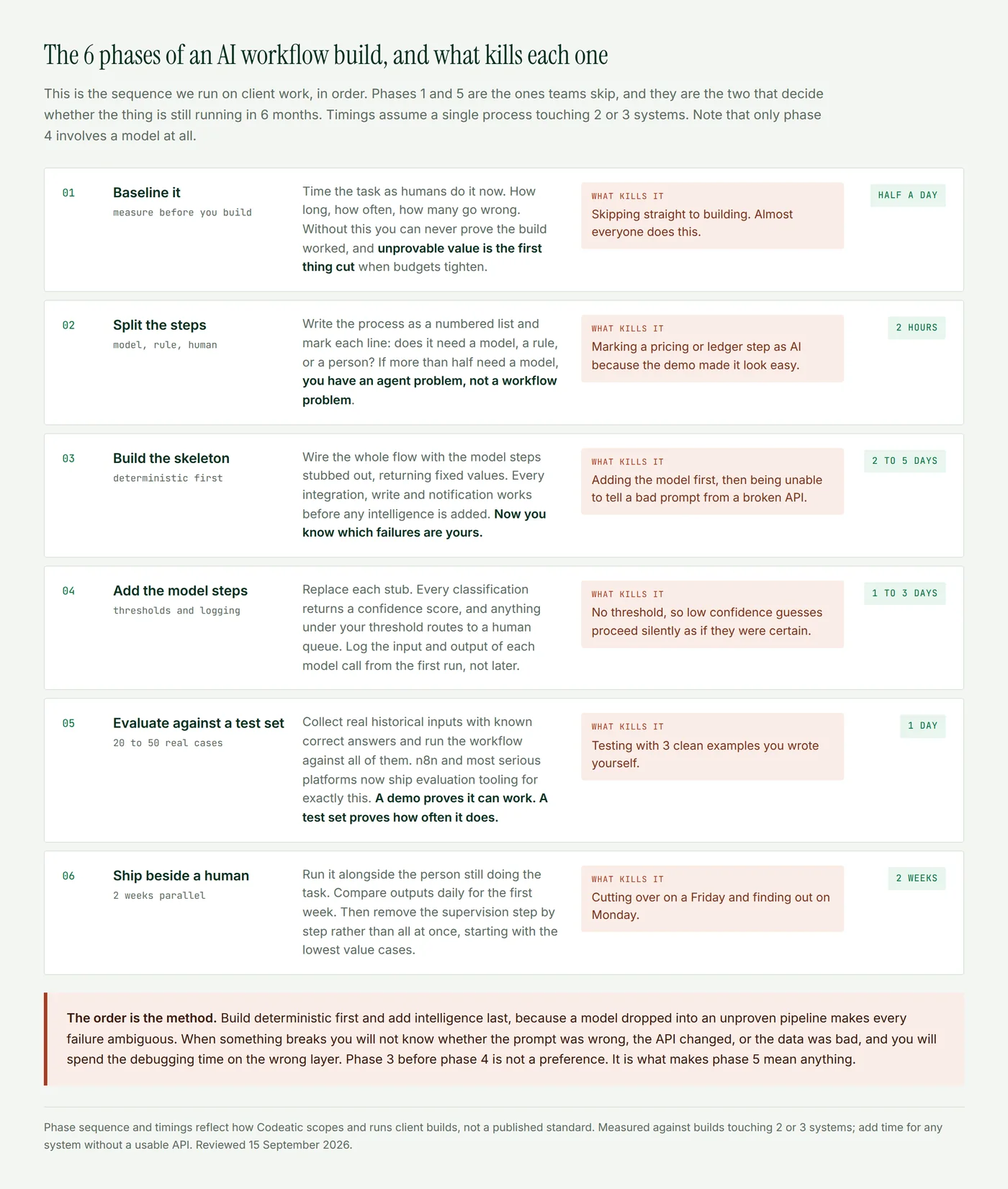
Two phases in that sequence are the ones teams skip, and they are the two that decide whether the build survives. Phase 1 because nobody wants to spend half a day timing a task they already find annoying. Phase 5 because the thing appeared to work in testing and everyone is keen to ship.
Why you build the deterministic parts first
Wire the entire flow with the model steps stubbed out, returning fixed values. The trigger fires, the record is created, the message sends, the exception routes. All of it works before any intelligence is added.
This feels like a detour and it is the opposite. When something fails in a finished AI workflow automation, the failure is ambiguous: bad prompt, changed API, malformed data, rate limit, or a model having an off day. Proving the pipeline before the model goes in removes 4 of those 5 possibilities from every future debugging session. It is the highest return hour in the whole build.
The same logic explains why chaining a few narrow model calls beats one large agent call for most business processes. Industry coverage of n8n's architecture patterns, published in July 2026, reports that chained requests cut API costs by 30% to 50% against monolithic agent calls, and the debugging benefit is larger than the saving.
Thresholds, queues and logs
Three things go in at phase 4, alongside the model steps, and all 3 are cheaper now than later.
- A confidence threshold on every classification. The model returns a score with its answer. Below your line, the item routes to a human instead of proceeding. Without this, a model that is right 92% of the time sends 8% of your work somewhere wrong, silently and with total confidence.
- A human queue that someone actually works. Not a log file. A visible list with an owner. n8n's send and wait pattern exists for exactly this, and HatchWorks, writing in March 2026, lists the cases that warrant it as outbound messages that cannot be unsent, financial actions and irreversible writes.
- A log of every model input and output. Time stamped, tied to the run, with the prompt version. You need it the first time somebody asks why a customer was told something.
How do you know it actually works?
Collect 20 to 50 real historical inputs where you already know the correct answer, and run the workflow against all of them. Not 3 clean examples you wrote yourself, which test nothing except that the wiring is connected.
This has stopped being manual work. n8n's own Production AI Playbook, published in May 2026, documents evaluation tooling that runs test cases from a data table through the same workflow and scores the output, including LLM as a judge scoring against criteria you define. Their guidance opens with the problem exactly: an AI workflow that works today can silently degrade tomorrow. Keep the test set. You will re-run it every time you touch a prompt or a model version changes underneath you.
From our work. Our automotive phone agent is the clearest example of why phase 3 matters. Early on it had a response lag of 1.5 seconds, long enough that callers talk over it. We got it to 0.5 seconds, and almost none of that came from the model. It came from voice activity detection thresholds and the round trip to the booking system, the deterministic layers either side.
The same pattern shows in the client builds behind our case studies. On Ziltrix, a security workforce platform, the voice agent took shift confirmation calls from 8 staff down to 1, recovered $42,000 a year in wasted salary and went live in 4 weeks. The model handled the conversation. Rules wrote every roster record. That split is why it held up.
The 6 checks after launch
A launched AI workflow automation is not a finished one. These are the numbers we watch on client builds, and 4 of them cost nothing to collect if you logged model calls from phase 4.
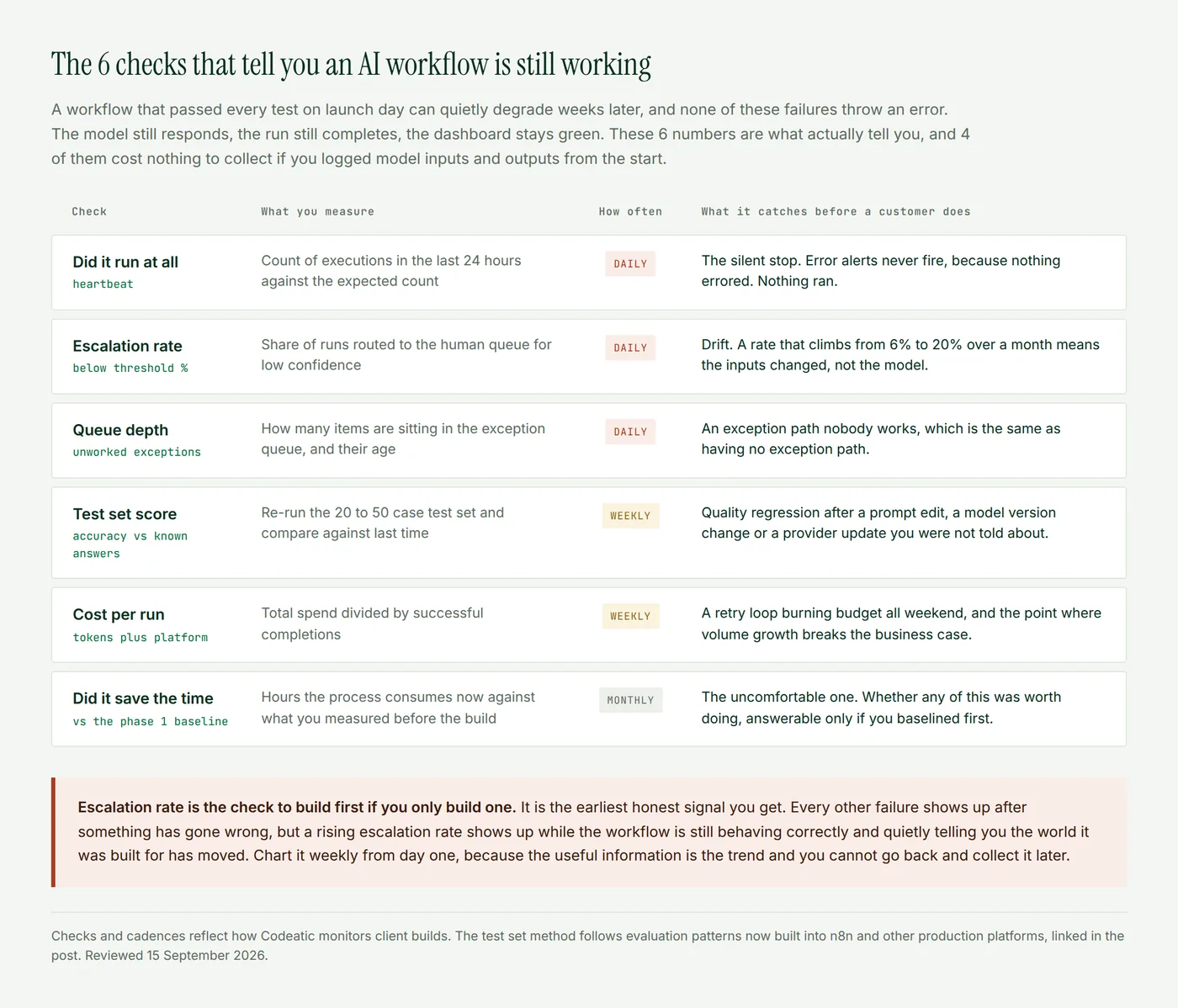
The pattern worth internalizing is that none of these failures throw errors. The run completes. The model responds. The dashboard stays green while the work quietly goes wrong, which is why monitoring an AI workflow automation is a different job from monitoring a script.
Which platform should you build on?
Less important than the sequence above, but every AI workflow automation conversation reaches it eventually.
n8n is the strongest default for AI workflows specifically. It bills per execution rather than per step, self hosts, has native model and evaluation nodes, and lets you drop into code when the canvas runs out. Its own build tutorial is a reasonable first hour. Make is a good middle option for branching logic without the server. Zapier wins on app coverage and non technical users, and gets expensive as step counts grow because of that per step billing.
A caution that outweighs any feature comparison: workflows do not port between these platforms. Outgrowing your tool means rebuilding, not migrating, so choose the one you expect to still be on in 2 years.
How long does it take?
For one process touching 2 or 3 systems with usable APIs, roughly 2 weeks of build followed by 2 weeks running beside a human. Our client builds land in the 4 to 8 week range end to end, and the variable is almost never the AI. It is whether the systems involved have APIs, whether the data is clean, and how fast someone can answer questions about edge cases.
Add time, sometimes a lot, for any system with no usable API. That single constraint moves more schedules than every other factor combined.
Where Codeatic fits in
We run exactly this sequence on client work. If your first workflow is a form into a spreadsheet, build it yourself this afternoon. If it touches a system with no clean API, needs judgment in the middle, or has to be defensible to an auditor, that is the work we take on.
The AI Opportunity Audit is a fixed $3,000 and produces the phase 1 and phase 2 output for your whole operation: processes baselined, steps split, candidates costed and ranked. There is a free self serve version if you would rather start alone, and our published client work has the detail behind the numbers above.
When to stop and not build
Three signals that an AI workflow automation is the wrong answer. Phase 1 shows the task consumes under an hour a month, so the payback never arrives. Phase 2 marks more than half the steps as model steps, which means the process is too variable for a workflow and you are looking at an agent. Or phase 2 cannot be completed at all, because 2 people do the task differently, in which case fix the process before automating the disagreement.
The short version
Baseline the task before you touch anything. Split the steps into model, rule and human. Build every deterministic part first with the model stubbed out, so failures stay unambiguous. Add model steps with a confidence threshold, a human queue and full logging. Test against 20 to 50 real cases with known answers. Run beside a human for 2 weeks. Then watch escalation rate weekly forever, because it is the earliest honest signal that the world your workflow was built for has moved.
How these figures were arrived at
The phase sequence, the timings and the monitoring cadences describe how we scope and run client builds. They are not a published standard, and they assume a process touching 2 or 3 systems with working APIs. Client outcomes quoted here are published on our case study page and measured against the manual baseline each client recorded before the build. The automotive latency figures come from a demo still under test, measured from the end of caller speech to the first audio the caller hears. Platform claims about pricing models and evaluation tooling are attributed inline, with the source and year named.
Reviewed 15 September 2026 by Usama Tariq, Co-Founder and CTO. If you find an error in this post, email info@codeatic.com and we will publish a correction on the page rather than editing it quietly.
Frequently asked questions
How do you build an AI workflow automation step by step?
Baseline the manual task, split the process into model, rule and human steps, build the deterministic skeleton with model steps stubbed out, add the model steps with confidence thresholds and logging, evaluate against 20 to 50 real test cases, then run it beside a human for 2 weeks before removing supervision.
Do I need to code to build one?
Not for most business workflows. Platforms like n8n, Make and Zapier cover the common cases visually. You need code, or somebody who writes it, when a system has no connector, when data needs real transformation, or when the branching outgrows what a canvas can show clearly.
How many test cases do I need before going live?
20 to 50 real historical inputs with known correct answers is enough to be meaningful for most business processes. What matters is that they are real and messy rather than examples you wrote, and that you keep them to re-run whenever a prompt or model version changes.
What is a confidence threshold and why does it matter?
It is the score below which the workflow sends an item to a person instead of acting on the model's answer. Without one, every low confidence guess proceeds as though it were certain, which is how a model that is right 92% of the time sends 8% of your work to the wrong place without telling anyone.
How do I know if my AI workflow is still working?
Watch 6 things: whether it ran at all, the share of runs escalating to a human, the depth of the exception queue, the score against your test set, cost per successful run, and time saved against the original baseline. None of these failures throw errors, so ordinary error alerting will not catch them.
Why do I need to baseline before building?
Because without a before number you can never prove the build worked, and unprovable value is the first thing cut when budgets tighten. Half a day of timing the task protects the entire investment.
Which platform is best for AI workflow automation?
n8n is the strongest default for AI specifically, with per execution billing, self hosting, native model nodes and built in evaluation. Make suits branching logic without a server, and Zapier suits non technical teams with wide app needs. Workflows do not port between them, so pick for the long term.
How long before it pays for itself?
For a process that runs daily and consumes real hours, typically within the first few months. The honest answer comes out of your phase 1 baseline rather than a vendor's calculator, which is most of why phase 1 exists.
Abdul Wahab, Co-Founder and CEO, Codeatic
Abdul has spent 5 years building software, across web stacks and mobile in React Native, Flutter and native Android, before moving into product, architecture and AI work. He holds an MS in Computer Science from PUCIT and leads Codeatic, an AI automation agency working with SMBs and startups across the US, Canada, the UK and Saudi Arabia. Connect on LinkedIn.
Technically reviewed by Usama Tariq, Co-Founder and CTO, Codeatic. Usama is an AI and computer vision engineer who builds production systems from unstructured video, image and speech data. He built the REVOX engine at Veedback, developed LLM and computer vision systems at Coeus Solutions GmbH, and led AI model development at OMNO AI. He is an OpenCV OAK-D finalist and a contributor to Workhub, and holds a BS in Computer Science from COMSATS University Islamabad. Connect on LinkedIn.