AI Workflow Automation: Where the Model Belongs
AI workflow automation puts a model in the few steps of a process that need reading, judging or writing, and leaves everything else as deterministic rules. This guide covers exactly where that boundary sits, why crossing it is behind most failed AI projects, what it costs, and the numbers from 5 builds we shipped.
On this page
AI workflow automation is a business process where most steps still run on fixed rules, and a model handles only the steps that require reading, judging or writing language. The automation part is unchanged: a trigger, conditions, actions. The AI part is narrow on purpose, because the steps a model is good at are not the steps a business can afford to have vary.
That framing matters more than any tool comparison, because the common failure in this category is not a bad model. It is a model placed in a step that should have stayed deterministic. This guide covers where AI belongs inside a workflow, where it does not, what the boundary costs to get wrong, and the numbers from 5 builds we shipped.
On this page
- What is AI workflow automation?
- How is it different from regular workflow automation?
- Why do most AI automation projects produce nothing?
- Which steps should be AI?
- The boundary rule
- What we shipped, and where the AI sits
- What does it cost?
- Governance before it touches a customer
- How to start in 20 minutes
- How these figures were arrived at
- Frequently asked questions
What is AI workflow automation?
It is the orchestration of a business process in which a model, rather than a fixed rule, drives specific steps. Everything else in the process still behaves like ordinary workflow automation: something triggers it, conditions are checked, actions fire in order.
The useful way to think about it is that three different participants share one workflow. Deterministic rules handle logic that must produce the same result every time. A model handles steps where the input is messy or the output is language. A human handles the cases where being wrong is expensive. Elementum, writing in April 2026, described enterprise AI workflow automation in exactly those three parts, and the framing holds at small business scale too.
Adoption is not the constraint. McKinsey's State of AI found that 72% of organizations had adopted AI in at least one business function by 2024, up from 55% a year earlier. Getting it into a workflow that survives contact with real operations is the constraint.
How is it different from regular workflow automation?
| Workflow automation | AI workflow automation | An AI agent | |
|---|---|---|---|
| Handles messy input | No | Yes, at specific steps | Yes, throughout |
| Who defines the path | You | You, with model steps inside it | The model, at runtime |
| Same input, same output | Always | Except at the model steps | Not guaranteed |
| Auditable | Fully | Fully, if you log model inputs and outputs | Harder |
| Cost per run | Cents | Cents plus tokens | Higher and variable |
| Right when | Steps never change | Most steps are fixed, a few need judgment | The path itself varies |
Most businesses that think they need an AI agent need the middle column. The agent is the right answer when the sequence of steps genuinely cannot be known in advance. That is rarer than the marketing suggests.
Why do most AI automation projects produce nothing?
The number everyone quotes comes from MIT's Project NANDA, whose July 2025 report The GenAI Divide found that 95% of enterprise generative AI pilots delivered no measurable impact on profit and loss, against an estimated $30 to $40 billion of spending. Only about 5% of custom enterprise AI tools reached production at all.
Worth knowing the criticism before you repeat the figure. The study rests on 52 structured executive interviews, 153 survey responses and analysis of more than 300 public deployments. It was not peer reviewed, and its definition of success is narrow: measurable return inside roughly 6 months. Critics have pressed hard on the precision of the number rather than its direction.
The direction is what matters here, and MIT's own diagnosis is not model quality. It is integration: brittle workflows, no retained context, and systems misaligned with how the work actually runs. Every one of those is a design decision about where the model sits, made before anyone writes a prompt.
Which steps should be AI?
Take one ordinary inbound enquiry and break it into the steps it actually contains. In a well built workflow, only a minority of them are model steps.
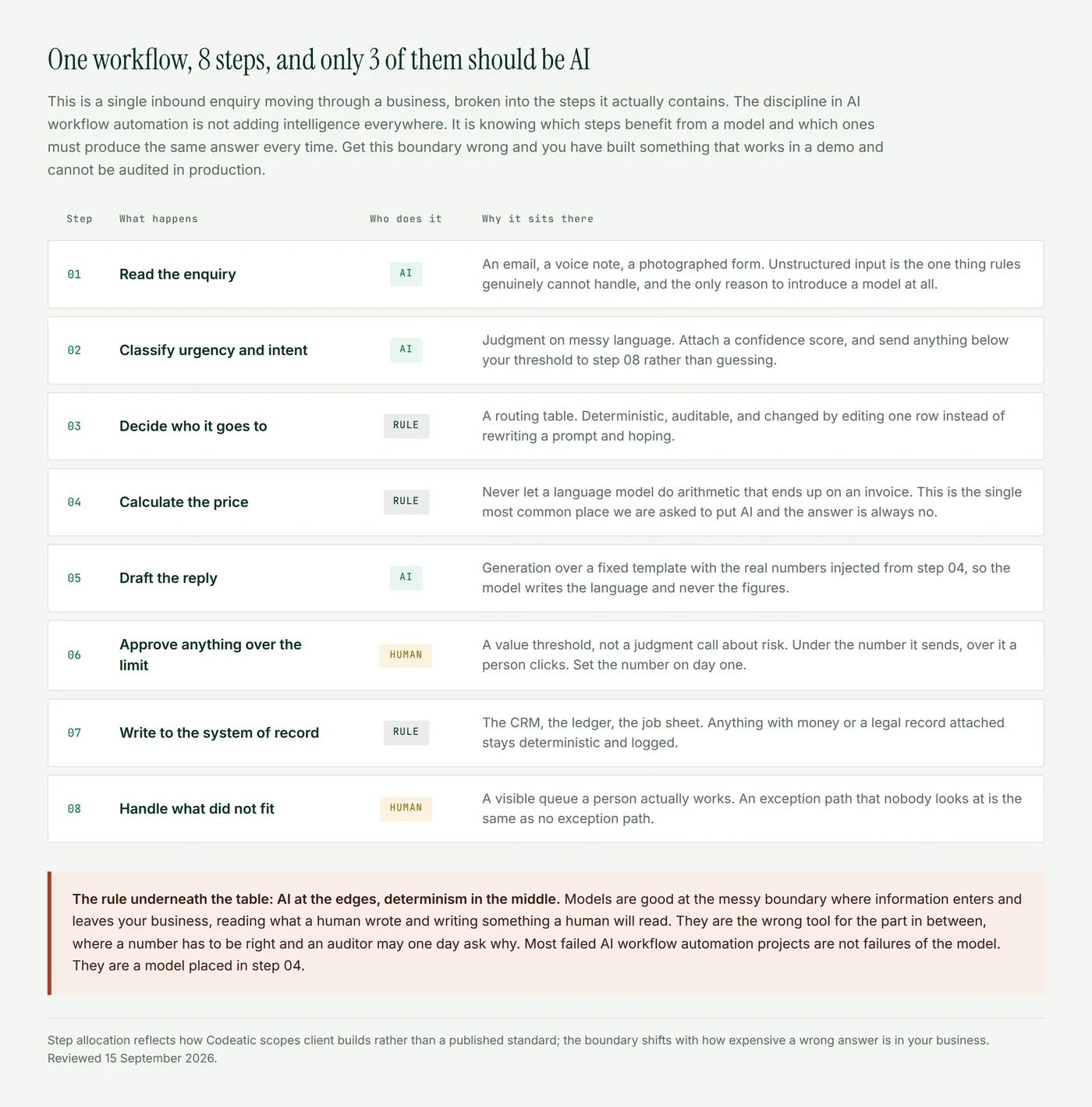
The pattern is consistent across every build we have shipped. The model earns its place at the point where information enters the business in a form no rule can parse, and at the point where something has to be written for a human to read. Between those two edges, rules do the work.
The boundary rule: AI at the edges, determinism in the middle
Three practical consequences follow, and they are the difference between a system you can operate and one you quietly stop trusting.
- Never let a model produce a number that appears on an invoice. Prices, totals, discounts and dates come from rules. The model writes the sentence around them. This is the request we decline most often.
- Attach a confidence threshold to every classification step. Below the line it goes to a human queue rather than proceeding. A model that is right 92% of the time is excellent, and 8% of your enquiries going silently to the wrong place is not.
- Log the input and output of every model step. Not for debugging, though it helps. For the day somebody asks why a customer was told something, and you need an answer better than a shrug.
Gartner projects that 40% of enterprises will migrate from robotic process automation to agentic automation by 2027, as reported in industry coverage of the shift. That migration will go badly for whoever reads it as permission to remove the deterministic layer instead of keeping it underneath.
What we shipped, and where the AI sits
Rather than an industry survey, here are our own builds with the model step identified in each.
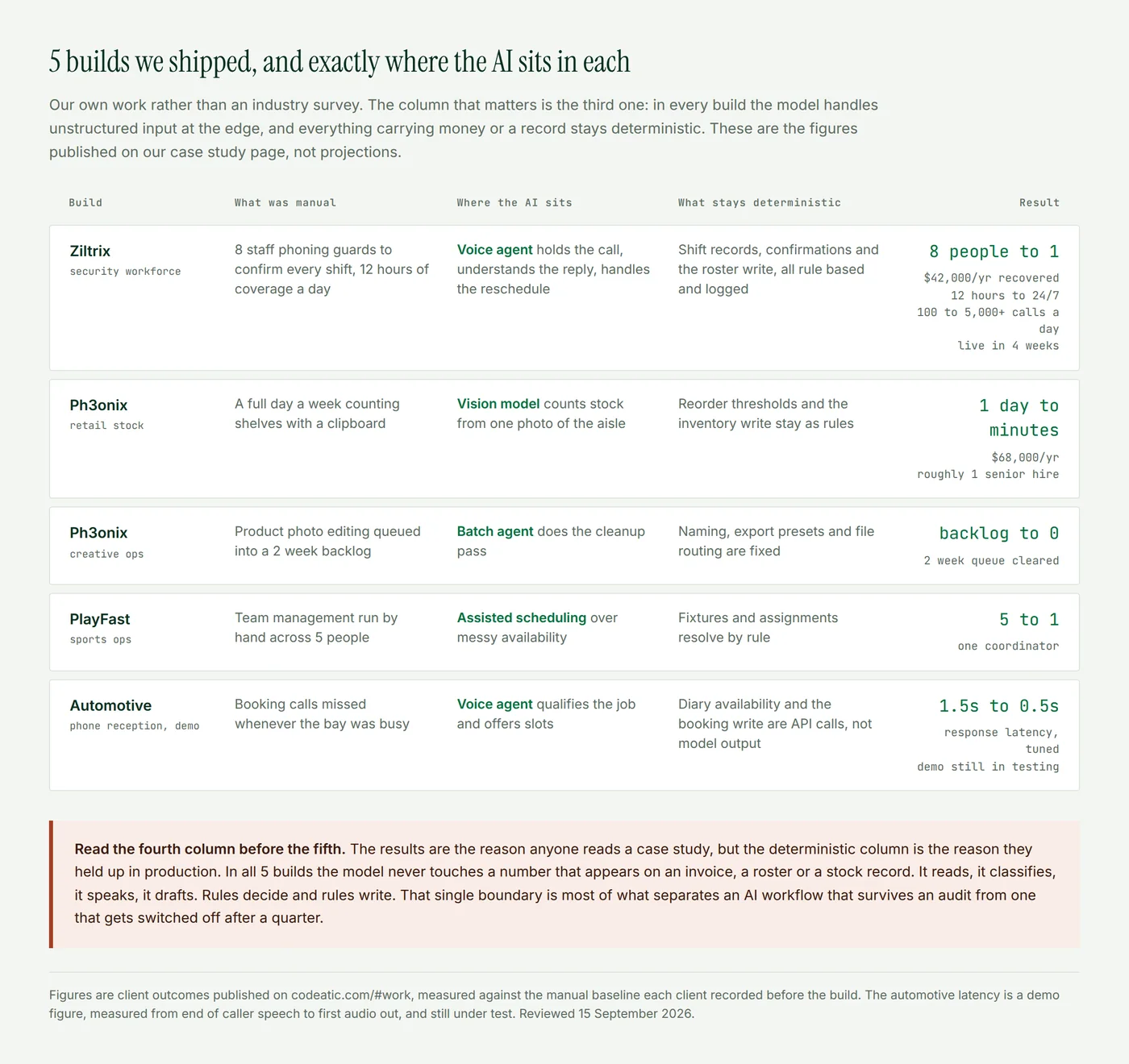
From our work. The automotive phone agent taught us the boundary the hard way. Early on the agent had a response lag of 1.5 seconds, which on a live call is long enough that callers start talking over it. Most of the tuning that brought it to 0.5 seconds was not model work. It was voice activity detection thresholds and the round trip to the booking system, the deterministic parts sitting either side of the model.
We also had to disable preemptive generation, the trick of starting a filler phrase while the real answer is still computing, because it was dropping the tool call afterward and leaving the agent silent on the line. Silence is worse than slowness. The lesson generalizes past voice: in an AI workflow, the model is rarely your bottleneck or your failure point. The systems around it are.
What does AI workflow automation cost?
Four costs. Most buyers budget for the first and are surprised by the third.
- The orchestration platform. $20 to $100 a month at small business scale, whether that is n8n, Make or Zapier underneath.
- Model usage. Per token, per step, every run. Cheap individually and worth capping, because a retry loop against a misconfigured tool runs all weekend without telling you.
- The build. Days to weeks, and almost none of it is prompt writing. It is integration, thresholds, exception queues and logging. Our own AI Opportunity Audit is a fixed $3,000 and produces the costed shortlist before anyone builds anything.
- Supervision in month one. Somebody reads the exception queue daily until the thresholds are right. Budget the hours or the system trains you to ignore it.
Governance before it touches a customer
Three things that are cheap before launch and expensive afterwards. Use model tiers that come with a data processing agreement suitable for your jurisdiction, since free and personal tiers generally do not qualify. Store every model input and output, time stamped and traceable to the workflow run, if the process touches financial records or customer data. And decide in advance what the workflow does when the model is unavailable, because it will be, and a queue is a better answer than a failure. Prime AI Solutions set out the same audit trail and data residency requirements in May 2026.
How to start in 20 minutes
Open the process you most want to automate and write down its steps, one line each. Mark every line that needs someone to read something unstructured or write something in words. Those are your candidate AI steps, and everything else stays a rule. If more than half your lines are marked, the process is not ready and you are looking at an agent problem rather than a workflow problem. If 2 or 3 are marked, you have a build worth costing.
Where Codeatic fits in
We build AI workflow automation for SMBs and startups, which in practice means the model steps, the deterministic layer around them and the integrations that make both real. Our published client work is on the site if you want the detail behind the figures above, and the AI Opportunity Audit maps your processes and scores each candidate step before a line of code is written. There is also a free self serve audit if you would rather start on your own.
When not to put AI in the workflow
Three cases. When every step has a knowable rule, because then you want plain automation and adding a model adds cost, latency and a new failure mode for nothing. When the process is inconsistent between people, because a model will encode the inconsistency faster than a human would. And when a wrong answer is expensive and irreversible, where the right build is capture and route to a person, not decide.
The short version
AI workflow automation puts a model in the few steps of a process that need reading, judging or writing, and leaves the rest as deterministic rules. Keep the model away from anything that produces a number on an invoice or writes to a system of record. Put a confidence threshold on every classification and a human queue behind it. Log every model input and output. Start with a process where 2 or 3 steps out of 8 need judgment, not one where everything does.
How these figures were arrived at
The client results in this post are outcomes published on our case study page, measured against the manual baseline each client recorded before the build, not projections or modeled savings. The automotive latency figure is from a demo still under test, measured from the end of caller speech to the first audio the caller hears, which is the only latency boundary worth comparing between vendors. The step allocation in the first figure reflects how we scope client work rather than a published standard, and the right boundary shifts with how expensive a wrong answer is in your business. External statistics are attributed inline with the publishing organization and the year.
Reviewed 15 September 2026 by Usama Tariq, Co-Founder and CTO. If you find an error in this post, email info@codeatic.com and we will publish a correction on the page rather than editing it quietly.
Frequently asked questions about AI workflow automation
What is AI workflow automation in simple terms?
A business process that runs by itself, where most steps follow fixed rules and a few specific steps use an AI model. The model handles things rules cannot, such as reading an email or drafting a reply, while the rules handle anything that must come out the same every time.
How is AI workflow automation different from normal automation?
Normal automation follows a path you defined and breaks on anything unexpected. AI workflow automation keeps that path but lets a model handle the steps involving unstructured input or generated language. The path is still yours, which is what keeps it auditable.
Which steps of a workflow should use AI?
Steps where information arrives in a form a rule cannot parse, such as an email, a voice note or a photographed document, and steps where the output is language a human will read. Routing, pricing, calculations and writes to your system of record should stay deterministic.
Do I need an AI agent or AI workflow automation?
If the sequence of steps is the same every time and only the content varies, you want AI workflow automation. If the sequence itself changes depending on what arrives, you want an agent. Most small business processes are the first case.
How much does AI workflow automation cost?
Platform costs run $20 to $100 a month at small business scale, plus model usage per step, plus the build. Integration and exception handling dominate the build cost, not prompt writing.
Why do so many AI automation projects fail?
MIT's Project NANDA found 95% of enterprise generative AI pilots delivered no measurable financial return, and attributed it to integration rather than model quality: brittle workflows, no retained context, and poor fit with how the work actually runs. In practice most failures come from putting the model in a step that should have stayed a rule.
Is AI workflow automation reliable enough for production?
At the steps it suits, yes, provided you attach a confidence threshold and route anything below it to a person. Reliability comes from the design of the workflow around the model, not from the model itself.
What should I automate first?
A process that runs often, has clear success criteria, and contains 2 or 3 steps needing judgment out of 8 or so total. Lead intake, document extraction and appointment handling fit this shape in almost every business.
Abdul Wahab, Co-Founder and CEO, Codeatic
Abdul has spent 5 years building software, across web stacks and mobile in React Native, Flutter and native Android, before moving into product, architecture and AI work. He holds an MS in Computer Science from PUCIT and leads Codeatic, an AI automation agency working with SMBs and startups across the US, Canada, the UK and Saudi Arabia. Connect on LinkedIn.
Technically reviewed by Usama Tariq, Co-Founder and CTO, Codeatic. Usama is an AI and computer vision engineer who builds production systems from unstructured video, image and speech data. He built the REVOX engine at Veedback, developed LLM and computer vision systems at Coeus Solutions GmbH, and led AI model development at OMNO AI. He is an OpenCV OAK-D finalist and a contributor to Workhub, and holds a BS in Computer Science from COMSATS University Islamabad. Connect on LinkedIn.