Claude for Small Business: What It Actually Does All Day
Small businesses use Claude for support, marketing, invoicing, reporting and leads, and since May 2026 those jobs come pre-built as Claude for Small Business.
On this page
Small businesses use Claude for the work that eats the day but never appears on an invoice: answering customers, drafting marketing, chasing money, making sense of the numbers, and handling new leads. Since May 2026 Anthropic has packaged that into Claude for Small Business, a set of 15 ready-to-run workflows, 15 reusable skills and connectors into the software a small company already runs on, included free with any paid Claude plan.
This is a practical look at what that means day to day: what Claude genuinely does for each of those jobs, what it is like to use, where it stops, and what to do about the part it cannot reach.
On this page
- What does Claude actually do for a small business?
- The 5 jobs owners hand it
- How can Claude improve customer support?
- How does Claude help with marketing?
- Is this marketing automation, or something else?
- Can Claude connect to the tools I already use?
- What does it cost?
- Where Claude stops and a build begins
- How to start this week
- How these figures were arrived at
- Frequently asked questions
What does Claude actually do for a small business?
It handles 5 kinds of work: answering customers, writing marketing, chasing invoices, assembling reporting and triaging leads. Underneath it is an AI assistant you talk to in plain language, and what changed in 2026 is that Anthropic stopped leaving owners to work the rest out for themselves and shipped those jobs pre-built.
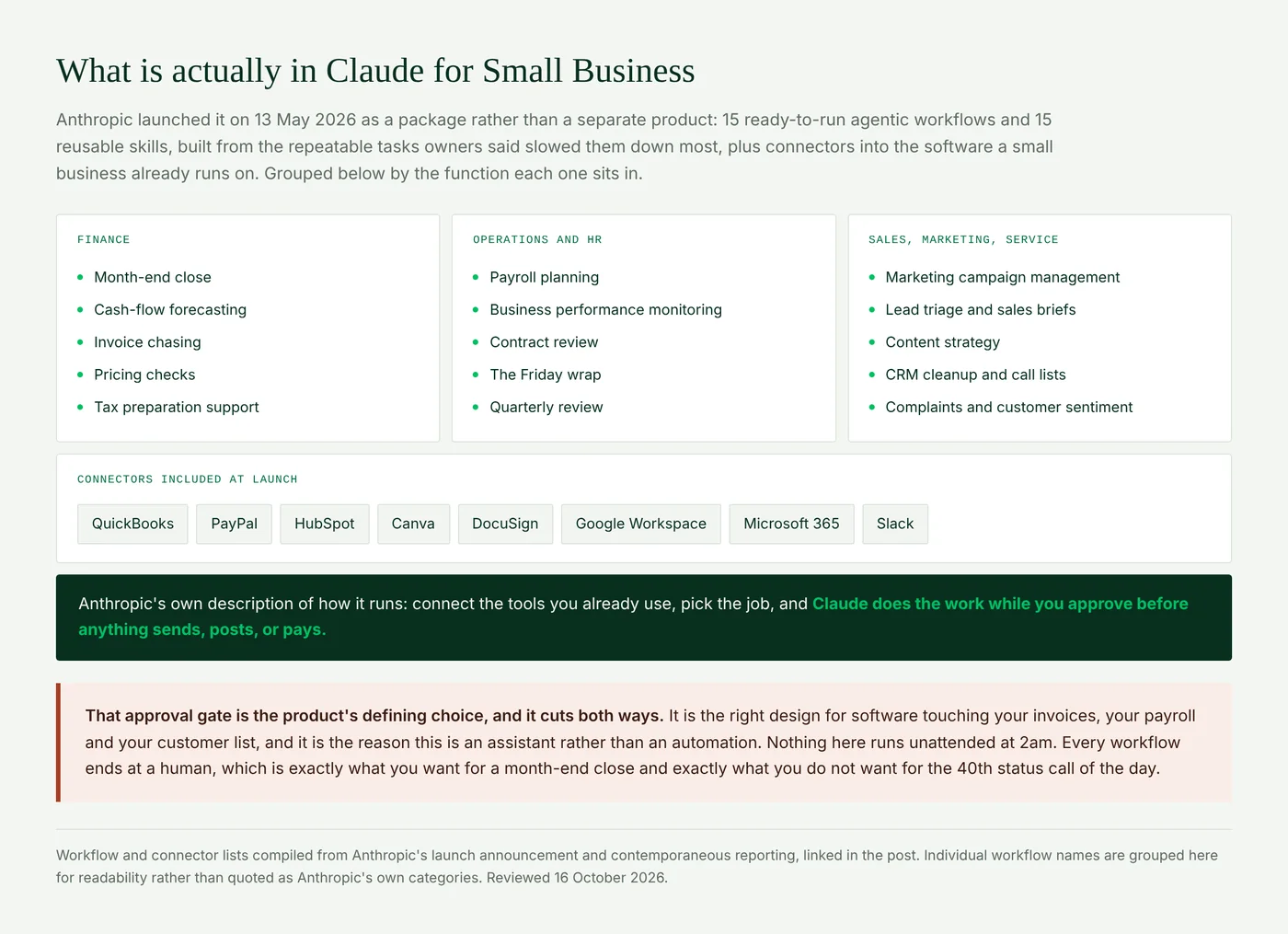
Anthropic describes the mechanics in one sentence in its launch announcement: connect the tools you already use, pick the job, and Claude does the work while you approve before anything sends, posts, or pays. Fast Company's coverage at launch noted the package covers payroll planning, month-end close, business performance monitoring and marketing campaign management, with skills for cash-flow forecasting, invoice chasing, contract review and lead triage.
The practical difference between a workflow and a skill: a workflow is a job with a start and an end, like closing the month. A skill is a capability the assistant can reach for inside any job, like chasing an invoice. You get both, and both are meant to be edited rather than used exactly as shipped.
The 5 jobs owners hand it
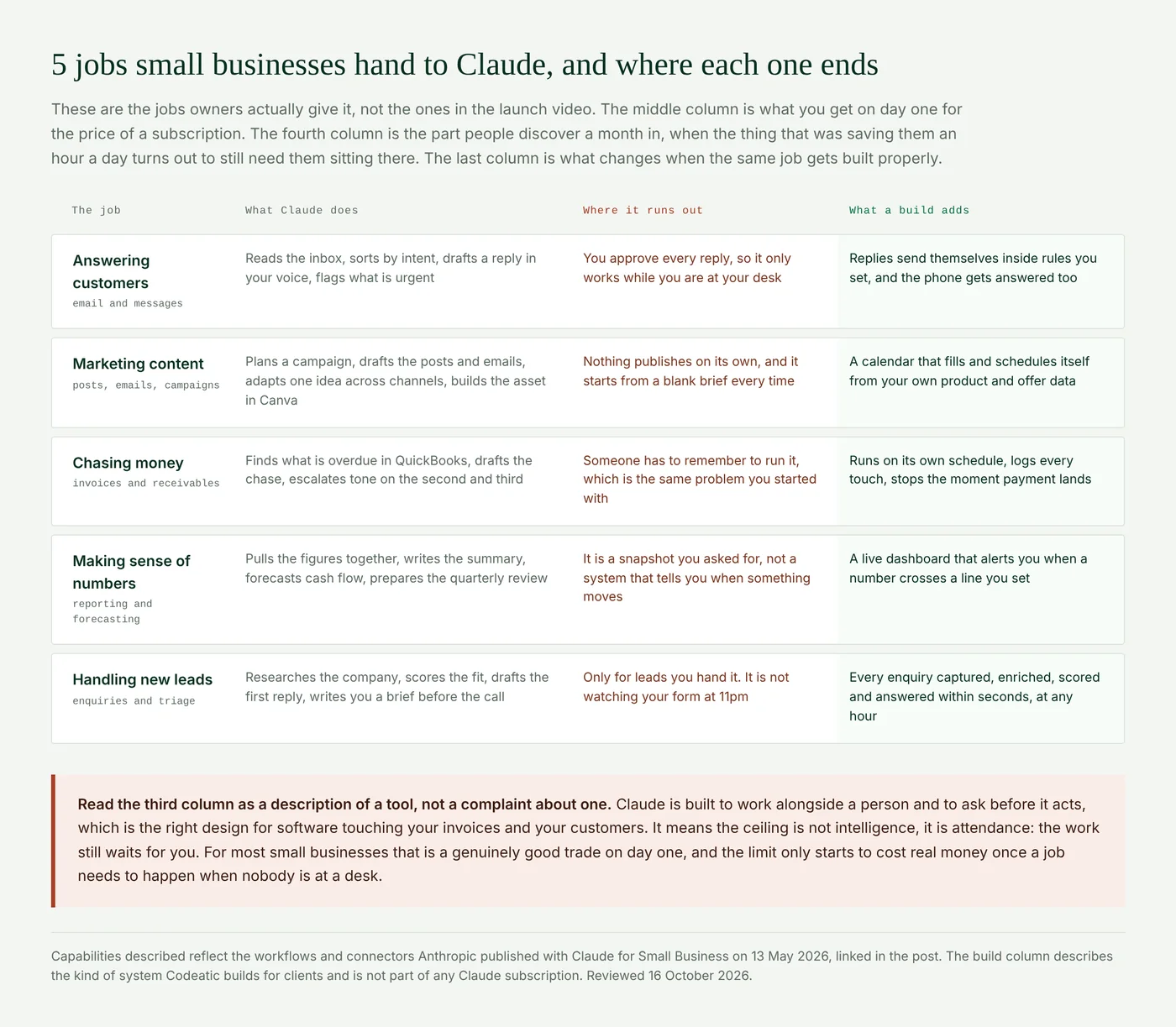
In text, so you can scan it:
- Answering customers. Claude reads the inbox, sorts messages by intent, drafts each reply in your voice and flags what is urgent. It stops at your approval, so it works while you are at your desk.
- Marketing content. It plans campaigns, drafts posts and emails, adapts one idea across channels and builds the asset in Canva. Nothing publishes on its own.
- Chasing money. It finds what is overdue in QuickBooks, drafts the chase and escalates the tone on the second and third. Someone still has to remember to run it.
- Making sense of numbers. It pulls the figures together, writes the summary, forecasts cash flow and prepares the quarterly review. It is a snapshot you asked for, not a system that tells you when something moves.
- Handling new leads. It researches the company, scores the fit, drafts the first reply and writes you a brief before the call. Only for leads you hand it, and it is not watching your form at 11pm.
The sections below go through the 4 of those that come up most, in the order small businesses usually try them.
How can Claude improve customer support?
This is the most common first use and the one that produces the fastest visible result, because support is mostly reading, deciding and writing, which is precisely what a language model is good at.
In practice it means Claude reads the inbox and sorts messages by what they actually are: a new enquiry, an existing customer with a problem, a billing question, a supplier, spam. It drafts a reply to each in your own voice once it has seen enough of your previous ones. It flags what is genuinely urgent instead of leaving you to judge from subject lines. And it can summarize sentiment across a week of conversations, which is the kind of thing nobody has time to do manually and which tells you more than any survey.
What it does not do is reply to your customers by itself. Every draft waits for you. That is a deliberate design choice and the right one for messages going out under your name, but it does mean support gets faster rather than smaller: you are still the bottleneck, just a much quicker one.
How does Claude help with marketing?
It plans the campaign, drafts the posts and emails, adapts one idea across channels and builds the asset in Canva. For a small business with no marketing hire, this is where a subscription pays for itself quickest.
Claude will plan a campaign from a short brief, draft the posts and emails, adapt one idea into versions for different channels, and build the asset in Canva through the connector. It will write product descriptions, rewrite a page that is not converting, and turn a customer conversation into a case study. The content strategy skill is designed for exactly the owner who knows they should be posting and has no system for deciding what.
The honest limitation is that it starts from a blank brief every time. It does not know what you ran last month unless you tell it, and nothing publishes without you. It is a very capable marketer who has to be briefed and supervised, which is a vast improvement on no marketer at all and a long way from a marketing system.
Is this marketing automation, or something else?
No, it is assistance rather than automation, and the distinction is worth getting straight because people search for both and they are not the same thing.
Marketing automation in the usual sense means rules that fire without you: a welcome sequence that sends when somebody subscribes, a reminder that goes out 3 days after an abandoned cart, a follow-up triggered by a form submission. Those run on a schedule, for every customer, whether or not anyone is logged in.
Claude is not that. It is assistance, not automation. It will draft every email in that sequence brilliantly and help you decide what the sequence should be, and then something else has to actually send them. Understanding that distinction early saves a lot of disappointment at the end of month one.
Can Claude connect to the tools I already use?
Claude for Small Business ships with connectors to QuickBooks, PayPal, HubSpot, Canva, DocuSign, Google Workspace, Microsoft 365 and Slack. That covers the accounting, payments, CRM, design, signing and office software most small businesses run on, which is the point: the setup problem is what stops most owners before they start.
For e-commerce specifically, the honest answer is that it depends on your stack. If your store pushes orders into QuickBooks and your customers into HubSpot, Claude is already looking at your commerce data through those. If you need it reading your storefront directly, that is outside the included connector set and becomes a build rather than a toggle.
What does it cost?
The package itself is free. There is no separate price for Claude for Small Business; you pay for the Claude plan it runs on, and it rides along.
For a solo owner that means Pro, listed on Anthropic's pricing page at $17 a month billed annually or $20 monthly. Once anyone else is involved you want Team, at $20 a seat annually, but note the plan sells a minimum of 2 seats, so the real floor is $40 a month rather than the $20 headline. The reason to move is less about usage than ownership: Team is the first tier where the business owns the account, with central billing, admin control over connectors, and no model training on your content by default.
The cost nobody lists is usage. Agentic work consumes plan limits considerably faster than chatting does, and Anthropic notes that activity across web, desktop, mobile and Claude Code draws from the same pool. Run several workflows daily and you will feel the ceiling on Pro.
One naming note, since it causes confusion: this launched as a toggle inside Claude Cowork, which is why you will see it called a plugin. Anthropic has since folded Cowork into the main Claude app, announcing that Claude Cowork is now just Claude. If you went looking for a separate product to install it into and could not find one, that is why.
Where Claude stops and a build begins
Everything above ends at a person approving it. For a lot of small business work that is exactly right. It stops being right the moment a job needs to happen when nobody is at a desk.
From our work. At Ziltrix, a security workforce platform, 8 staff spent their days ringing guards to confirm shifts. No assistant solves that, because the work is 200 outbound calls on a schedule, not 200 drafts waiting for approval. The system we built took it to 1 person handling exceptions, moved coverage from 12 hours to 24/7, raised capacity from 100 calls a day to more than 5,000, and recovered $42,000 a year in salary. It went live in 4 weeks.
At Ph3onix, a full working day every week went on counting shelf stock by hand. Now someone photographs the aisle and the counts land in the system by themselves, worth roughly $68,000 a year, about the cost of a senior hire. Again, not a drafting problem. A process problem.
We use Claude every day and recommend it to owners constantly. The distinction we keep drawing for clients is simple: Claude works for a person, a build works for a process. Most small businesses need both, and almost everyone should start with the subscription.
What changes when one of those 5 jobs gets built rather than assisted is specific. Replies send themselves inside rules you set, and the phone gets answered too. The marketing calendar fills and schedules itself from your own product data. Invoice chasing runs on its own schedule, logs every touch and stops the moment payment lands. Reporting becomes a live dashboard that alerts you when a number crosses a line you set. And every enquiry gets captured, enriched, scored and answered within seconds, at any hour. None of that is a smarter assistant. It is the same work, moved off a person.
If you are reading this wondering which parts of your own business fall on which side of that line, our free AI audit answers exactly that. It takes your business name and location, reads your public footprint the way a customer would, and returns a scored list of what could be automated, each finding rated for how automatable it is, how complex, how important and how confident the audit is, with the evidence behind it and an honest list of what it could not work out. It takes a couple of minutes and costs nothing.
How to start this week
- Get on Pro. The agentic workflows need a paid plan. Start there rather than Team unless you already have staff who will use it.
- Connect one tool, not eight. Whichever holds the work you want handled first, usually QuickBooks or your CRM.
- Run one workflow end to end. Invoice chasing is the usual first pick because the output is easy to check.
- Read everything it produces for 2 weeks. Every time, before approving. You are teaching it your voice and learning its limits at once.
- Edit the workflow instead of abandoning it. The second run is almost always better than the first.
- Write down what still waits for you. That list is your build list, and it is worth keeping even if you do nothing with it for a year.
Where Codeatic fits in
We are not reselling anything and take no commission. If the workflows cover your problem, get a Pro plan and you are done.
What we build is the other half: voice agents that answer your phone line, AI call agents for specific industries, and workflow automation that runs on a schedule and writes to your systems without anyone approving each step. Our guide to what an AI agent is covers the difference properly. If you want a second opinion on where the line sits in your business, get in touch.
When it is not the answer
When your bottleneck is customer-facing and happens outside the hours you work, because approvals cannot run at 2am. When the systems holding your work are not among the 8 connectors and have no usable API. And when you already know the one specific thing you want automated permanently, in which case you want it built rather than assisted.
The short version
Small businesses use Claude for support, marketing, invoicing, reporting and lead handling, and since May 2026 those jobs come pre-built as Claude for Small Business: 15 workflows, 15 skills and 8 connectors, free on top of a paid plan that starts at $17 a month. It is genuinely good at all 5, and every one of them ends with you approving the result. That makes it assistance rather than automation, which is the right trade for most owners on day one and a real ceiling once work needs to happen while nobody is watching.
How these figures were arrived at
Workflow counts, connector lists and the description of how the package runs come from Anthropic's launch announcement of 13 May 2026 and contemporaneous reporting, attributed inline. Plan prices were taken from claude.com/pricing on 16 October 2026; Anthropic lists prices excluding tax and states that plans and pricing may change, so check before buying. The grouping of workflows by business function in the first figure is ours for readability rather than Anthropic's own categories, and the descriptions of where each job runs out reflect the product's documented approval behavior rather than tests we ran. Client outcomes are published on our case study page and measured against the manual process each client recorded before the build.
Reviewed 16 October 2026 by Usama Tariq, Co-Founder and CTO. If you find an error in this post, email info@codeatic.com and we will publish a correction on the page rather than editing it quietly.
Frequently asked questions
What can Claude do for a small business?
Sort and draft replies to customer messages, plan and write marketing campaigns, find and chase overdue invoices, pull together reporting and cash-flow forecasts, and research and triage new leads. Since May 2026 those come as pre-built workflows rather than something you have to set up yourself.
How can an AI assistant improve customer support for a small business?
By doing the reading and the first draft. Claude sorts the inbox by intent, writes a reply to each message in your voice, flags what is actually urgent and summarizes sentiment across conversations. You approve before anything sends, so support gets faster rather than unattended.
Can Claude write marketing content for my business?
Yes, and it is one of the strongest fits. It plans campaigns, drafts posts and emails, adapts one idea across channels and builds assets through the Canva connector. It starts from a brief each time and publishes nothing by itself, so treat it as a capable marketer who needs briefing.
Is Claude a marketing automation tool?
No. Marketing automation means rules that fire without you, like a welcome sequence or an abandoned-cart reminder. Claude drafts and plans that work brilliantly, then something else has to send it. It is assistance rather than automation.
Which tools does Claude connect to?
Claude for Small Business includes connectors for QuickBooks, PayPal, HubSpot, Canva, DocuSign, Google Workspace, Microsoft 365 and Slack. For e-commerce, it usually sees your commerce data through accounting and CRM rather than connecting to the storefront directly.
How much does Claude for Small Business cost?
The package is free. You pay for the plan: Pro at $17 a month billed annually or $20 monthly for one person, or Team at $20 a seat annually with a 2 seat minimum, so $40 a month is the real floor once you have staff.
Can Claude answer my business phone?
No. Nothing in the package connects to a phone line or holds a live spoken conversation with a customer. That is a voice agent, a separate system built around a process rather than around a person.
What does Claude not do for a small business?
Anything unattended. It will not send a reply, publish a post, pay an invoice or answer a customer without you approving it, and it does not run on a schedule across your whole customer base. Work that has to happen while nobody is at a desk needs a built system rather than a subscription.
Abdul Wahab, Co-Founder and CEO, Codeatic
Abdul has spent 5 years building software, across web stacks and mobile in React Native, Flutter and native Android, before moving into product, architecture and AI work. He holds an MS in Computer Science from PUCIT and leads Codeatic, an AI automation agency working with SMBs and startups across the US, Canada and the UK. Connect on LinkedIn.
Technically reviewed by Usama Tariq, Co-Founder and CTO, Codeatic. Usama is an AI and computer vision engineer who builds production systems from unstructured video, image and speech data. He built the REVOX engine at Veedback, developed LLM and computer vision systems at Coeus Solutions GmbH, and led AI model development at OMNO AI. He is an OpenCV OAK-D finalist and a contributor to Workhub, and holds a BS in Computer Science from COMSATS University Islamabad. Connect on LinkedIn.