Security Guard Scheduling Software: Costs, Limits, Fixes
Scheduling software builds the roster and posts open shifts, but it can't make a guard answer at 2 a.m. What it costs, where it stops, and how security companies automate the call-offs, reminders and follow-ups their supervisors still handle by hand.
On this page
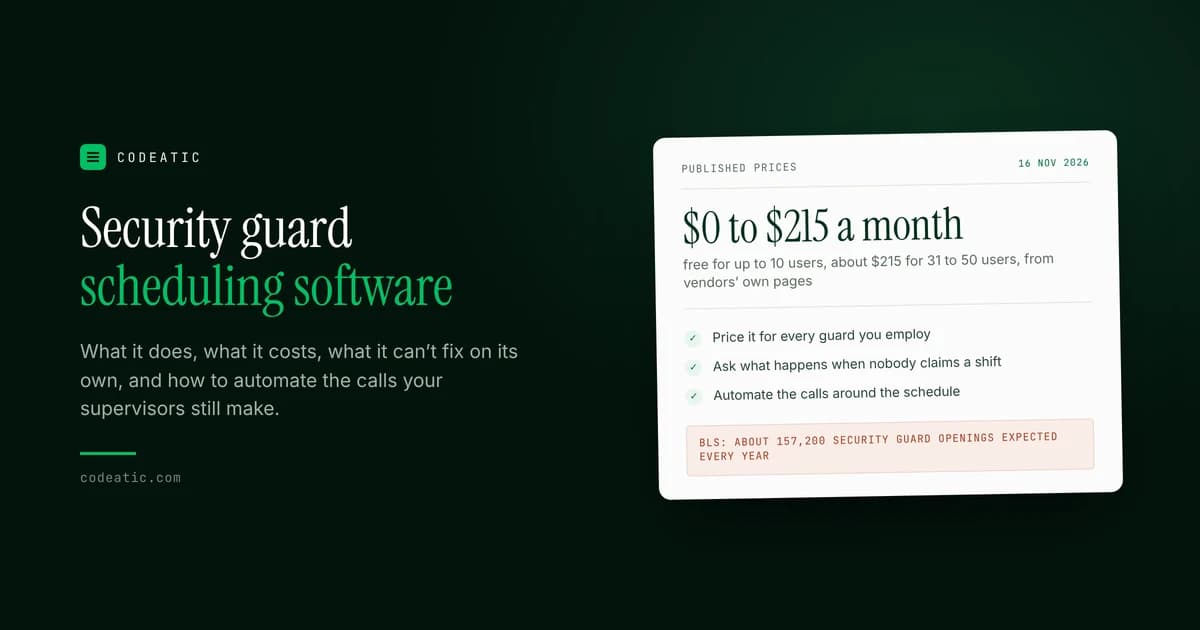
Security guard scheduling software builds your roster, shows who is working where, and sends open shifts to your guards' phones. Published prices start at $0 for very small teams and run to about $215 a month for 50 users. What it can't do on its own is make sure a guard actually answers at 2 a.m. when a post goes empty.
This guide is for owners and operations managers of security guard companies in the US and Canada. It covers what the software does, what it costs, where it stops, and how to automate the work that still lands on your supervisors.
What Codeatic does: AI automation for security and cleaning companies. We find the work your team still does by hand, then build the automations and AI agents that do it. Start with our free automation audit, which takes 1 to 3 minutes.
Written by Abdul Wahab, Co-Founder and CEO of Codeatic. Technical review by Usama Tariq, Co-Founder and CTO. Reviewed 16 November 2026.
On this page
- What the software does
- Why guard scheduling is so hard
- What it costs
- What it can't fix on its own
- How to automate the rest
- Questions to ask before you buy
- How Codeatic helps security companies
- Frequently asked questions
What does security guard scheduling software do?
It replaces the spreadsheet and the group text. You build shifts for each site, guards see them on their phones, and the system flags gaps, overtime and late clock-ins.
Most tools built for security companies cover the same basics:
- Rosters by site and post: day, night, weekend and 24/7 shifts across all your client locations.
- Guard availability: who can work when, so you don't book someone twice.
- Open shifts: post an empty shift and let qualified guards claim it from the app.
- Clock in by location: GPS check-in shows that a guard is actually at the post.
- License and training records: so an unlicensed or unarmed guard isn't sent to the wrong post.
- Timesheets and payroll export: hours worked flow into payroll instead of being retyped.
Why is scheduling security guards so hard?
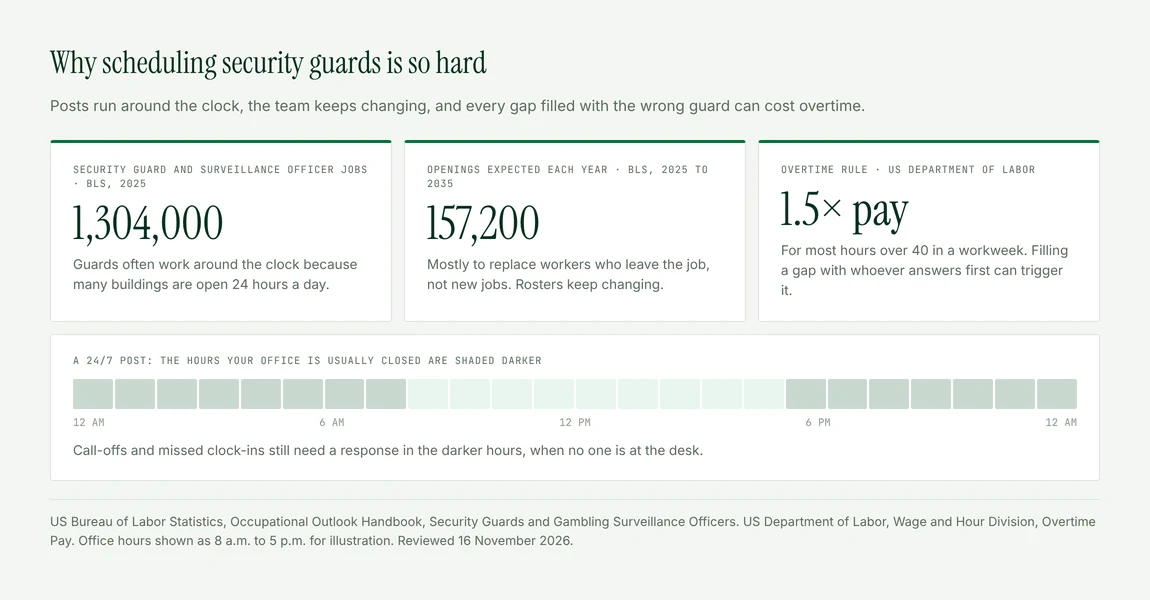
Because the posts never close and the people keep changing. The US Bureau of Labor Statistics counts about 1,304,000 security guard and surveillance officer jobs, and expects about 157,200 openings every year over the next decade. Most of those openings come from guards leaving the job, not from new jobs. So a roster that worked last month already has new names on it.
The hours make it harder. As BLS puts it:
"Because many buildings and casinos are open 24 hours a day, security guards and officers often must work around the clock."
So every gap has to be filled at night and on weekends too, when your office is usually closed.
Mistakes also cost money. Under the federal Fair Labor Standards Act, most employees must be paid at least time and a half for hours over 40 in a workweek. When a supervisor fills a gap with whoever answers the phone first, that guard is often the one already close to 40 hours.
How much does security guard scheduling software cost?
Published prices run from free for teams of up to 10 users to about $215 a month for 31 to 50 users, depending on the tool and how it charges. These are from each company's own pricing page, checked on 16 November 2026, in US dollars.
| Tool | How it charges | Published price |
|---|---|---|
| Connecteam | Flat price for the first 30 users | Free for up to 10 users; paid plans from $29 a month for the first 30 users, then per user |
| Deputy | Per user, per month | From $5 per user a month, with a $30 monthly minimum on monthly plans |
| THERMS | By team size | $45 a month for 1 to 5 users, $155 for 16 to 30, $215 for 31 to 50 |
Some platforms built for larger security firms don't publish prices and quote on request. When you compare, ask what the price is for your real headcount, including part-time and on-call guards, because per-user pricing grows every time you hire.
What can't scheduling software fix on its own?
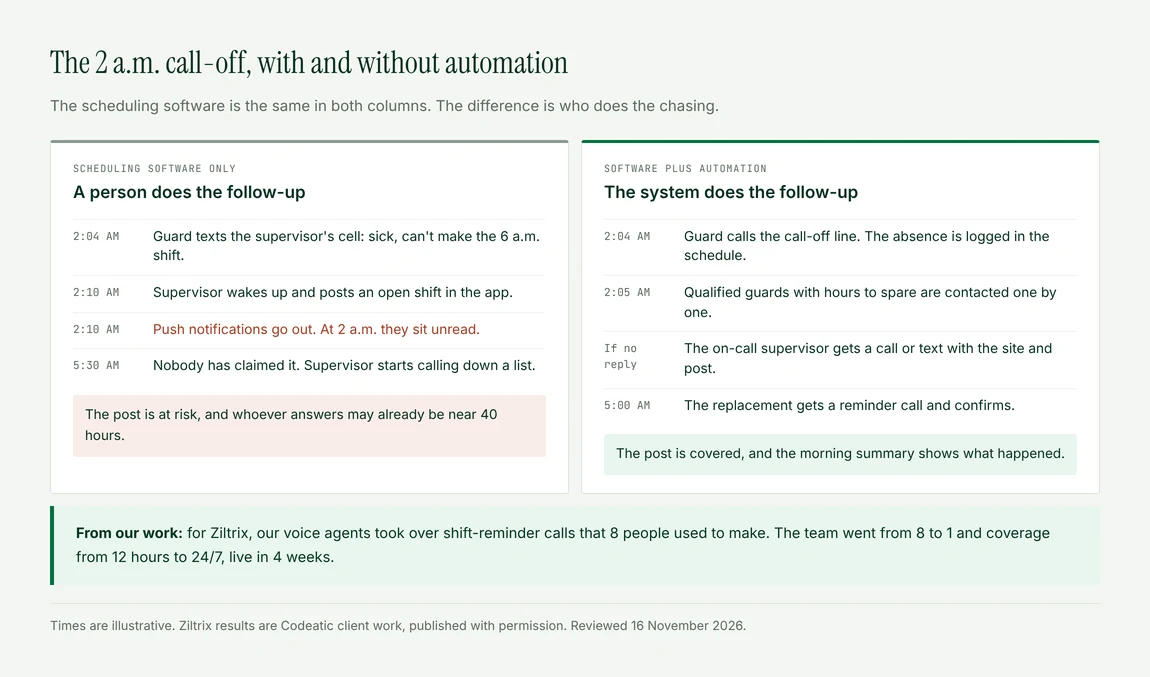
It can post an open shift, but it can't make a guard read the notification. The 2 a.m. call-off, the guard who doesn't confirm, and the client who calls about an empty post still end up with a person on your team.
Here is where the work usually stays manual, even with good software:
- Call-offs by phone. When a guard calls or texts a supervisor instead of using the app, someone has to answer, often at night.
- Unanswered open shifts. A push notification is easy to miss. When nobody claims the shift, someone starts calling down a list.
- Shift reminders and confirmations. Knowing that a guard has seen tomorrow's shift is different from knowing they are coming.
- Late or missed clock-ins. The software can flag it. Someone still has to reach the guard, and then the client.
- Work spread across systems. Scheduling, payroll, client reports and incident logs often live in different places, so data gets copied by hand.
The software holds the schedule. Your team still does the chasing.
How do you automate the work around the schedule?
Keep the scheduling tool you already use, and add automation for the calls, follow-ups and handoffs your supervisors do by hand. Big software companies sell you another tool. In our work with security companies, the faster win has been automating the way the team already works.
Common automations for security companies:
- Reminder calls before each shift. An AI voice agent calls the guard, confirms they are coming, and flags anyone who doesn't confirm.
- A call-off line that never sleeps. Guards call or text one number at any hour. The call-off is logged and the open shift goes out straight away.
- Filling open shifts in order. The system contacts qualified guards one by one, skipping anyone who would go into overtime, until someone accepts.
- Escalation. If no one accepts within a set time, the on-call supervisor gets a call or text with the site and post.
- License expiry alerts. Guards and managers get a reminder before a license runs out.
- A morning summary. Call-offs, filled shifts and anything still open, in one message before the office opens.
The first one is work we have built. For Ziltrix, a company building a product to manage security firms, we built voice agents that took over the shift-reminder calls 8 people used to make. The team went from 8 people to 1, coverage went from 12 hours to 24/7, and the agents can handle more than 5,000 calls a day, up from about 100. It was live in 4 weeks.
What should you ask before you buy security guard scheduling software?
Ask what it costs for your real headcount, how it fills an open shift when nobody claims it, and whether it can connect to your payroll and other tools. These are the questions security company owners ask most:
- What will it cost for every guard I employ, including part-time and on-call guards?
- How does it fill an open shift, and what happens if nobody claims it?
- Can it stop a guard from being booked into overtime?
- Can it block guards without the right license or training from certain posts?
- Does it check clock-ins by location, and who gets the alert when a guard is late?
- Does it connect to my payroll software?
- Can I manage every site and client from one screen?
- Can I export my data if I leave, and can other tools connect to it?
The last question matters more than it looks. If the tool connects to other systems, you can automate around it later. If it doesn't, everything outside it stays manual.
How Codeatic helps security companies
Codeatic builds AI automation for security and cleaning companies. We don't sell you another scheduling app. We look at how your team runs shifts today, then automate the calls, reminders and follow-ups around the tools you already use. You own 100% of the code we write.
- Free automation audit. Give it your company name or website. In 1 to 3 minutes it scores how ready you are for AI out of 100 and lists the work still done by hand. No card and no account. Run it here.
- AI Opportunity Audit. A free 30-minute call first. If an audit is the right next step, it is a fixed $999 and takes 7 to 10 days. You get a ranked plan you can approve, shelve or hand to any developer. See what it covers.
- Build. We build what the plan says is worth it, usually in 4 to 8 weeks.
For more on how these agents work, see our guide to voice agents. Or talk to us about your shifts.
The short version
- Scheduling software builds rosters, posts open shifts, checks clock-ins and tracks licenses.
- Published prices start free for up to 10 users and run to about $215 a month for 31 to 50 users.
- Guard scheduling is hard because posts run 24/7 and BLS expects about 157,200 openings a year.
- The software holds the schedule. Call-offs, confirmations and unanswered open shifts still land on people.
- Automate the calls and follow-ups around the tool you already use, starting with shift reminders.
How these figures were arrived at
Job and wage figures are from the US Bureau of Labor Statistics Occupational Outlook Handbook. The overtime rule is from the US Department of Labor. Prices are from the published pricing pages of Connecteam, Deputy and THERMS, checked on 16 November 2026. Plans and prices change often, so check before you buy.
The Ziltrix results are Codeatic's own client work, published with permission. The questions in this guide and the FAQ below come from what Google, Google AI Mode and ChatGPT showed for this topic in November 2026. If you find an error, tell us and we will correct it and note the correction.
Frequently asked questions
How much does security guard scheduling software cost?
Published prices start at $0 for small teams. Connecteam is free for up to 10 users, Deputy starts at $5 per user a month, and THERMS charges $45 a month for 1 to 5 users and $215 for 31 to 50. Larger platforms often quote on request.
Is there free security guard scheduling software?
Yes, for very small teams. Connecteam lists a free plan for up to 10 users. Once you pass that size, you will pay per user or by team size, so check the price for your full headcount, including part-time and on-call guards.
How do I automatically replace a guard who calls out?
Set up one call-off line or app that logs the absence, then contacts qualified guards in order until one accepts. Skip anyone who would go into overtime. If nobody accepts in a set time, alert the on-call supervisor with the site and post.
Can I automate shift reminders for security guards?
Yes. Most scheduling apps send push reminders, and an AI voice agent can also call each guard before a shift and ask them to confirm. Anyone who doesn't confirm gets flagged so a supervisor can act before the post goes empty.
Can scheduling software track guard licenses?
Many security-focused tools store license and training records and can block unqualified guards from certain posts. Ask whether the tool sends reminders before a license expires, and who receives them.
How can a security company reduce overtime?
Track each guard's weekly hours in one place, block shifts that would take someone past 40 hours, and fill open shifts from guards with hours to spare first. Federal law requires time and a half for most hours over 40 in a workweek.
Is scheduling software worth it for a small security company?
Usually yes, once you run more than a handful of guards across several sites. A free or low-cost plan can replace the spreadsheet. The bigger savings come from automating the calls and follow-ups that still fall on your supervisors.
Can AI create security guard schedules?
Some tools can suggest or fill shifts automatically using availability, licenses and hours. AI can also handle the calls around the schedule, such as reminders and call-offs. A person should still approve changes for sensitive or high-risk posts.