AI Automation Consultant: What They Do, Cost, How to Hire
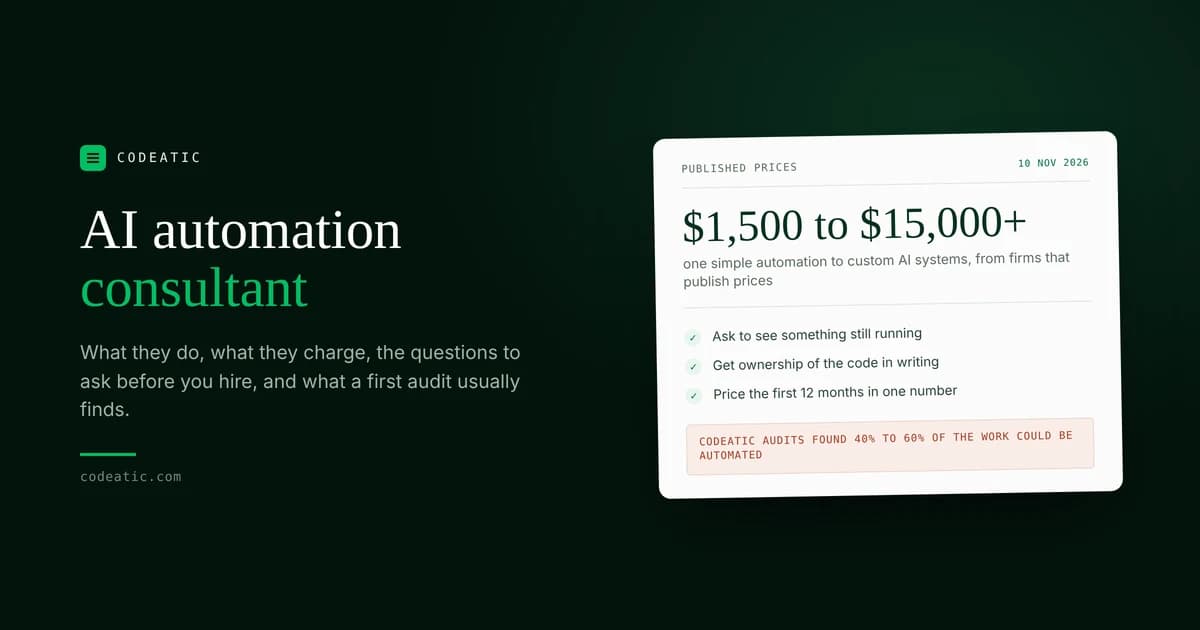
Published prices run from about $1,500 for one simple automation to $15,000 and up for custom AI. What an AI automation consultant actually does, when you can do it yourself, the 8 questions to ask before you hire, and what four real audits found.
On this page
An AI automation consultant looks at how work gets done in your business, finds the repetitive tasks software can take over, and then plans or builds the automations that do them. Published prices start around $1,500 for one simple automation and run past $15,000 for custom AI systems, so the first job is finding the work that is worth paying for.
This guide is for owners of small and mid-sized businesses in the US and Canada who are thinking about hiring one. It covers what they do, what they charge, how to tell a good one from a bad one, and what a first audit usually finds.
What Codeatic does: we find what is worth automating in your business, then build the automations and AI agents that do it. You can start with our free automation audit, which takes 1 to 3 minutes.
Written by Abdul Wahab, Co-Founder and CEO of Codeatic. Technical review by Usama Tariq, Co-Founder and CTO. Reviewed 10 November 2026.
On this page
- What an AI automation consultant does
- Do you need one, or can you do it yourself?
- What it costs
- Consultant, agency or freelancer
- Questions to ask before you hire
- What a first audit usually finds
- Who owns what gets built
- How long it takes
- How Codeatic works
- Frequently asked questions
What does an AI automation consultant do?
They find the tasks your team repeats every day, work out which ones a computer can handle, and set up the tools to do them. The good ones look at your work before they suggest any software.
A typical project has four steps:
- Look at the work. They talk to you and your team and map how a job moves through the business: where it starts, who touches it, and where it gets stuck.
- Pick what to automate first. Not everything is worth it. They rank tasks by how much time they take and how hard they are to automate.
- Build it. They connect the tools you already use, such as your email, CRM, calendar or accounting software, and add AI where a task needs judgment, like reading a document or answering a call.
- Hand it over. You get the working system, the accounts it runs on and a way to fix it when something changes.
Common examples are answering and logging customer calls, following up on quotes, typing data from forms or invoices into another system, sending reminders, and building weekly reports.
Do you need one, or can you do it yourself?
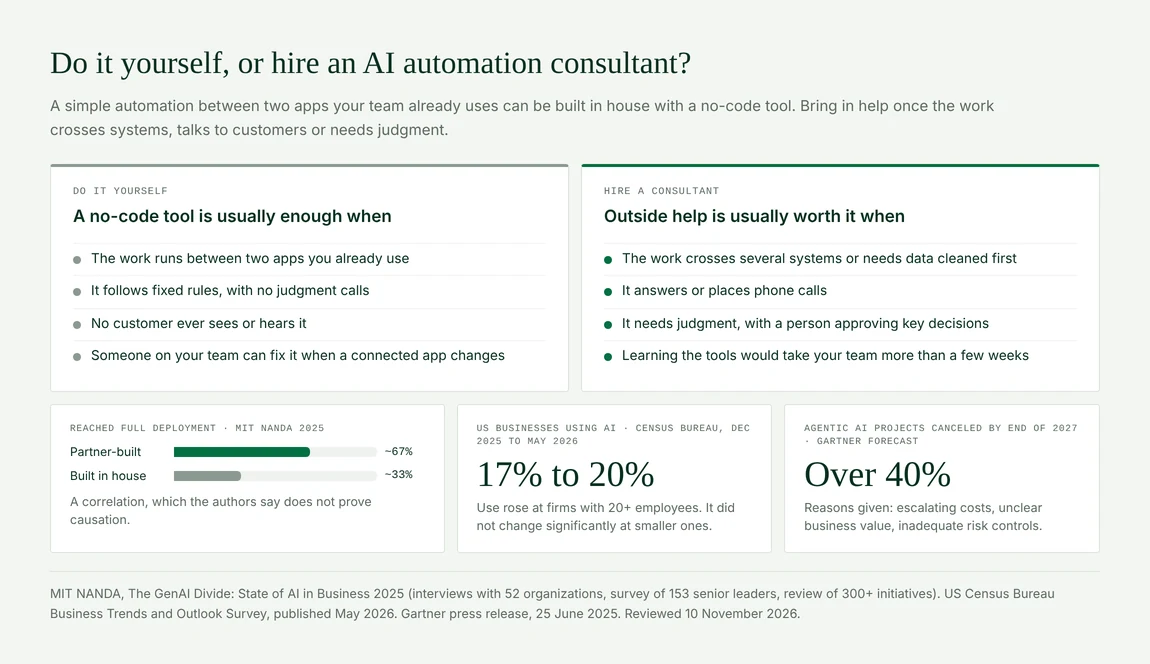
If the task is simple and stays inside two apps you already use, you can usually do it yourself with a no-code tool. Bring in a consultant when the work crosses several systems, talks to customers, or needs judgment.
You can probably do it yourself when:
- The task moves information between two apps, such as a web form into a spreadsheet.
- It follows the same fixed rule every time.
- No customer sees or hears it.
- Someone on your team can fix it when an app changes.
A consultant is usually worth it when the work touches several systems, answers or makes phone calls, needs messy data cleaned up first, or would take your team weeks to learn.
Outside help also seems to raise the odds of finishing. MIT's NANDA research found that AI tools built with outside partners reached full use about 67% of the time, against about 33% for tools companies built on their own. The authors say this shows a link but doesn't prove the cause. Companies that hire partners may simply be better organized.
Most small businesses haven't started at all. The US Census Bureau found that 17% to 20% of US businesses used AI between December 2025 and May 2026, and use did not change significantly at firms with fewer than 20 employees. Their staff are often ahead of them: a Federal Reserve Board note found that about 41% of US workers used generative AI for work as of November 2025.
How much does an AI automation consultant cost?
Firms that publish their prices charge about $1,500 to $4,000 for one simple automation, $7,000 to $12,000 for a build that connects several tools, and from $15,000 for custom AI systems. Monthly running costs for simple builds are about $50 to $400. These figures come from the pricing pages of firms that publish them, checked on 10 November 2026.
| What you buy | Published price range |
|---|---|
| Paid audit or roadmap | About $1,000 to $25,000 |
| One simple automation between tools you already use | $1,500 to $4,000 |
| A build that connects several tools, with some AI | $7,000 to $12,000 |
| One AI agent for support, chat or booking | From $8,000 |
| Custom AI systems and advanced agents | From $15,000, up to about $150,000 |
| Running costs for simple builds | About $50 to $400 a month |
The build price is only part of the bill. Ask for the full cost of the first 12 months in one number: the build, the monthly software and AI usage, phone minutes if calls are involved, and support after launch. A cheap build on expensive monthly tools can cost more by the end of the year.
Codeatic's paid AI Opportunity Audit is a fixed $999 and takes 7 to 10 days. The free automation audit costs nothing. See how we work or run the free audit now.
Consultant, agency or freelancer: what's the difference?
A consultant mainly tells you what to automate. A freelancer mainly builds what you already decided. An agency usually does both, with a team behind it. In practice the names overlap, so judge by what they will actually deliver.
- Consultant: best when you don't yet know where to start. Ask whether they also build, or only hand you a plan.
- Freelancer: best for one clear task with a clear spec. Ask who fixes it if they move on to other work.
- Agency: best when the work spans several systems or includes AI agents and phone calls. Ask who exactly will do the work.
- Off-the-shelf software: best when a ready-made product already does what you need. Check that before you pay anyone to build it.
What should you ask an AI automation consultant before you hire them?
Ask them to show you something they built that is still running, explain what they would automate first in your business and why, and give you the full cost to build and run it. These are the questions small business owners ask most, and what a good answer sounds like.
- "Can you show me something you built that is still running?" A good answer is a real system, with numbers from before and after.
- "What would you automate first in my business, and why?" They should ask about your work before naming a tool.
- "What will it cost to build and to run for the first year?" You want one number, not just the build fee.
- "How will we know it worked?" Agree on a measure up front, such as hours saved a week or calls answered.
- "What happens when it breaks?" Someone should get an alert, and you should know who fixes it and how fast.
- "Who will actually do the work?" Ask for names, not just the person selling it.
- "Where does my data go, and who can see it?" They should name the services your data passes through and tell you whether those services can use it to train their AI.
- "What should we not automate?" A consultant who says "everything" hasn't looked closely.
Be careful with big promises. Gartner predicts that over 40% of agentic AI projects will be canceled by the end of 2027, mostly because of rising costs, unclear value and weak risk controls. Questions 3, 4 and 5 are the ones that catch those problems early. Gartner's analyst also warned:
"Many use cases positioned as agentic today don't require agentic implementations."
In plain words: plenty of jobs sold as needing an AI agent can be done with a simpler, cheaper automation. That is what question 8 is for.
What does a first AI automation audit usually find?
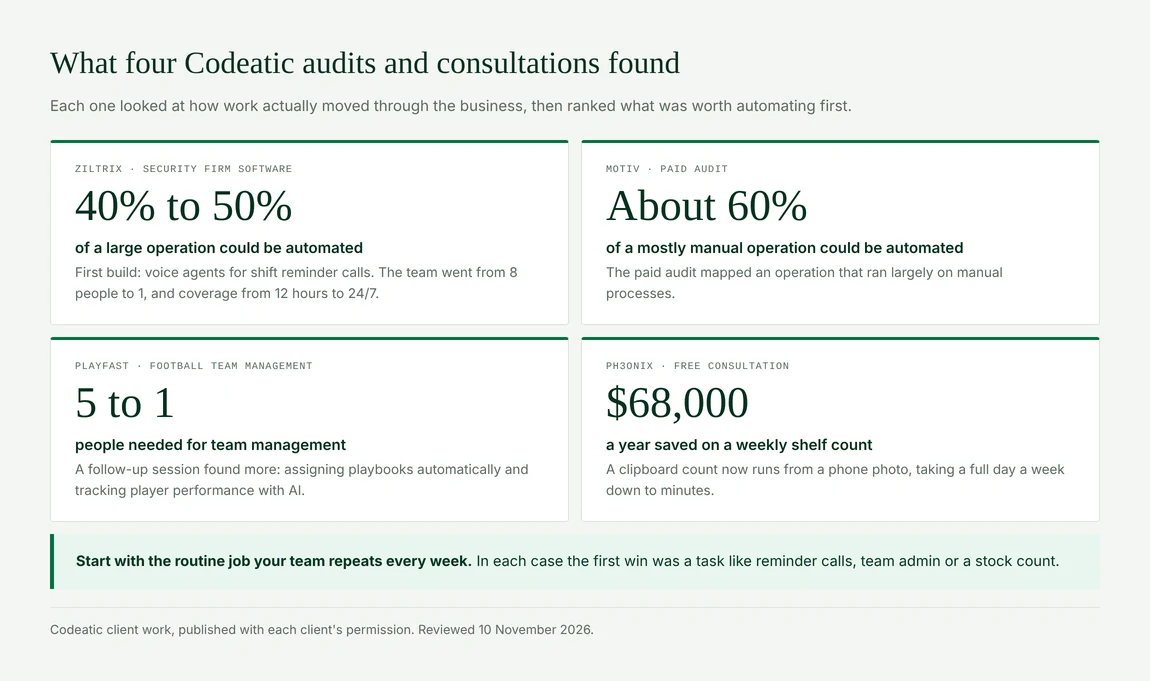
In our audits, a large share of the day-to-day work can be automated: roughly 40% to 60% in the two larger operations we have audited. Here is what four of our audits and consultations found, shared with each client's permission:
- Ziltrix, which is building a product to manage security firms: roughly 40% to 50% of a large, end-to-end operation could be automated. We started with the calls reminding guards about their shifts: we built voice agents that now make them. The team that made those calls went from 8 people to 1, and coverage went from 12 hours to 24/7.
- MOTIV: a paid audit of an operation that ran largely on manual processes, where roughly 60% could be automated.
- PlayFast, a football team management business: team management was first automated from 5 people to 1. A follow-up session found more, including assigning playbooks automatically and using AI to track player performance.
- Ph3onix: a weekly shelf count done on a clipboard is now done from a phone photo. That took a full day a week down to minutes, worth about $68,000 a year.
In each case the first win was a routine job the team repeated every week: reminder calls, team admin, a shelf count. That is usually where to start.
Who owns the automations a consultant builds?
You do, but only if your contract says so in writing. Under US copyright law, custom software written by an outside contractor doesn't automatically belong to the client.
The US Copyright Office explains that commissioned work only counts as "work made for hire" if it fits one of 9 listed categories and both sides sign a written agreement. Software isn't on that list. Without a written transfer, the contractor usually owns it. Canada has its own rules, so check with a lawyer in your province. This is general information, not legal advice.
Ask for three things: the code in an account you control, every service the system runs on opened in your company's name, and a written transfer of ownership in the contract. If everything sits in the consultant's accounts, leaving them means starting over.
How long does an AI automation project take?
An audit takes about 1 to 2 weeks. One simple automation can be live in a few weeks, and a connected system or an AI agent usually takes 4 to 8 weeks. Our Ziltrix voice agents were live in 4 weeks.
Start with one task that hurts and happens often. Build it, measure it, then move to the next one. Trying to automate a whole department in one contract is how projects drag on and the value gets hard to see.
How Codeatic works
Codeatic finds what is worth automating in your business, then builds the automations and AI agents that do it. We work with businesses in the US and Canada, and you own 100% of the code we write.
- Free automation audit. Give it your business name or website. In 1 to 3 minutes it researches your business from public sources, scores how ready you are for AI out of 100, and lists the work still done by hand that AI could take over. No card and no account. Run it here.
- AI Opportunity Audit. A free 30-minute call first. If an audit is the right next step, it is a fixed $999 and takes 7 to 10 days. You get a ranked plan you can approve, shelve or hand to any developer. See what it covers.
- Build. We build what the plan says is worth it, usually in 4 to 8 weeks, with every account in your name.
Not sure where to start? Talk to us. If an audit isn't the right next step, we'll say so on the call.
The short version
- An AI automation consultant finds the repetitive work in your business and plans or builds the tools that do it.
- Simple automations start around $1,500; builds across several tools run $7,000 to $12,000; custom AI starts at $15,000.
- Do simple, two-app tasks yourself. Hire help when the work crosses systems, talks to customers or needs judgment.
- Ask for something still running, the full first-year cost, and a clear measure of success.
- Get ownership of the code and accounts in writing.
- Start with one painful task that happens often.
How these figures were arrived at
Price ranges come from the public pricing pages of AI automation firms that publish prices in US dollars, checked on 10 November 2026. We don't name them here, and the ranges are shown as published. Adoption figures are from the US Census Bureau, May 2026, and the Federal Reserve Board, April 2026. The cancellation forecast is from Gartner, June 2025. The partner and in-house figures are from MIT NANDA's The GenAI Divide: State of AI in Business 2025. The ownership rules are from US Copyright Office Circular 30.
Audit results are Codeatic's own, published with each client's permission. The questions in this guide and the FAQ below come from what Google, Google AI Mode, ChatGPT and Perplexity showed for this topic in November 2026. If you find an error, tell us and we will correct it and note the correction.
Frequently asked questions
What does an AI automation consultant do?
They study how work moves through your business, find the repetitive tasks software can take over, and plan or build the automations. That can mean connecting your existing tools, adding AI to read documents or answer calls, and handing you a system your team can run.
How much does an AI automation consultant cost?
Firms that publish prices charge about $1,500 to $4,000 for one simple automation, $7,000 to $12,000 for a build across several tools, and from $15,000 for custom AI. Paid audits run from about $1,000. Add monthly running costs, often $50 to $400 for simple builds.
Is an AI automation consultant worth it for a small business?
Yes, if a repetitive task costs your team several hours every week and crosses more than one system. Work out the hours saved times what those hours cost, and compare it with the full first-year price. If the task is simple and stays in two apps, try a no-code tool first.
Should I hire a consultant or an agency?
Hire a consultant if you need help deciding what to automate. Hire an agency if you also need it built and supported, especially for AI agents or phone calls. Many firms do both, so ask whether the people who plan the work also build it.
Do I need technical knowledge to work with one?
No. You need to know your business: how jobs come in, where they get stuck and which tasks eat the most time. A good consultant handles the technical side and explains it in plain words. You should still be able to see and run what they build.
Can AI automation work with the software I already use?
Usually, yes. Most projects connect tools you already have, such as email, a CRM, a calendar or accounting software. Ask the consultant to list which of your tools they will connect and how, before you sign.
Is my business data safe with AI automation?
It can be, if you ask the right questions. Find out which services your data passes through, who can access it, and whether those services can use it to train their AI. Keep the accounts in your company's name so you stay in control.
What happens if an automation stops working?
A well-built system sends an alert when something fails, so a person can step in. Before you hire, ask who gets that alert, who fixes it, how fast, and what it costs after launch. Tools you connect will change over time, so plan for upkeep.